Every released version of the portier Vision 5 software has been developed, tested, and approved in accordance with our certified Quality Management and Information Security Management System (ISMS) as per ISO/IEC 27001:2022. All functional and security tests (including regression, release, and where applicable, penetration tests) were successfully completed prior to the release.
The current ISO/IEC 27001:2022 certificate as well as further compliance documentation can be found in our Trust Center: https://trust.portierglobal.com
If required, we are happy to provide you with additional information or specific proof. Please feel free to contact us here.
Release Date: 20.04.2026
New KWD File Import: KWD files can now be imported directly. Files from KWD version 8 and newer are supported.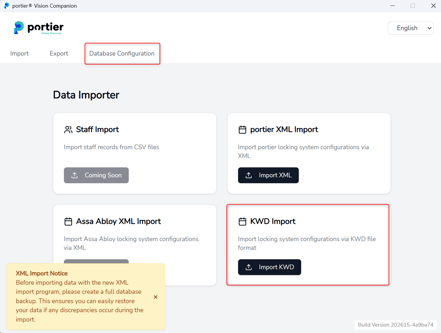
Approval Process Shortcut: A shortcut for the approval process has been added to the Daily Task menu, allowing it to be started directly from there.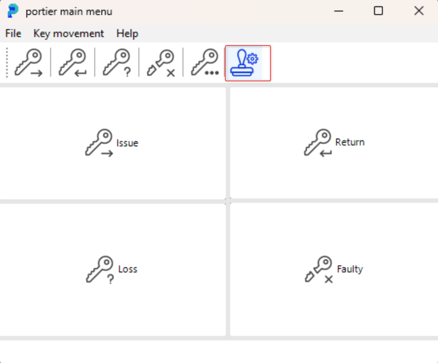
Password Management for Administrators: Administrators can now force a password reset for individual users. Additionally, the password expiry can now be set in days.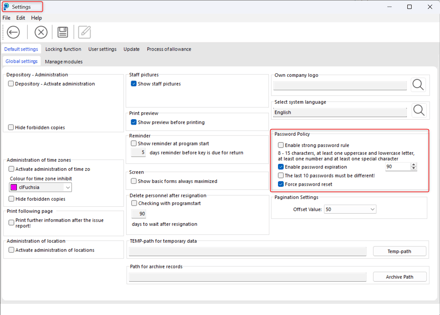
Reminder List Print Bug Fixed: A bug has been fixed that occurred when trying to print the reminder list.
General performance optimisations for system startup, switching between systems, and loading settings.
A splash screen is now displayed after startup, giving users better feedback on the loading progress.

Release Date: 03.03.2026
Introduced Active Directory (AD) login validation during application startup
Release Date: 24.02.2026
Fixed password save error when saving user data
Corrected password reset logic after 90 days
Updated and improved Companion
Release Date: 20.02.2026
Fixed reminder list print reports
Optimized application performance (load time and saving settings)
Added configurable pagination offset values in Settings
Added batch update of exemplar status in the Search and Replace function
Added filter keys for unassigned depot in Search Query
Cylinder update via re-import of XML files
Companion enhanced: attempts database connection via TCP/IP, Named Pipes, or local connection
General improvements to portier Companion
Release Date: 12.01.2026
ODBC driver is no longer required
ID cards can now be printed
General improvements and optimizations
Release Date: 28.11.2025
1. Permission issue with reorders
Fixed: Users without the correct permissions were able to trigger reorders.
The permission check has been corrected and now works as intended.
2. Service URL reset issue
Fixed: The Vision application automatically reset the service URL to portier-service.de on startup.
The configured URL now remains persistent and is no longer overwritten.
3. Additional improvements and fixes
Various minor issues have been resolved to improve stability and performance.
Release Date: 13.11.2025
Description
A database issue was identified where null values in critical columns caused related records to disappear from the user interface. The following elements were affected:
Keys
Cylinders
Locking Systems
Although the data existed in the database, it did not appear in the UI, resulting in inconsistent system behavior.
Impact
Users could not view or manage affected entries.
Locking systems appeared incomplete or missing.
Data exports and overviews did not match the actual database contents.
Resolution
Implemented improved validation to ensure UI visibility no longer depends on null-sensitive fields.
Added safeguards to prevent incomplete records from causing display failures.
Updated internal logic to handle missing values more reliably.
Description
During role assignment, the system occasionally inserted empty tile structure values into the database.
Root Cause
A misconstructed LIKE operator in the query prevented the correct tile structure from being retrieved. This resulted in incomplete permission data being written.
Impact
Incorrect or missing UI tiles for affected users.
Permissions did not reflect the assigned roles.
Administrators needed to manually correct user configurations.
Resolution
Corrected the query logic responsible for retrieving tile structure information.
Fixed and validated the LIKE operator to ensure proper pattern matching.
Added protective checks to prevent saving empty tile structure entries.
Description
When attempting to activate a license online, the system displayed an Unauthorized (401) error.
Root Cause
The issue was not caused by Chargebee authentication.
The application failed to correctly load its configuration settings, causing it to miss the Chargebee API key during activation.
Impact
Online license activation failed.
Users were required to retry or switch to manual activation.
Resolution
Corrected the settings-loading process to ensure the Chargebee API key is consistently available.
Added validation logic to confirm that required configuration values are present before starting the activation process.
Improved error handling to prevent false 401 errors when configuration data is incomplete.
Release Date: 22.10.2025
Improved French Translations
The French language pack has been thoroughly revised for better accuracy, clarity, and consistency throughout the application.
Database Owner Check
Before executing an update, the application now verifies whether the SQL user has DB-Owner rights. This ensures that updates cannot run without sufficient permissions, preventing potential data issues.
Database Version Check
With this update, the application will now verify that the local database version matches the server version before proceeding. This prevents mismatched versions and ensures data integrity between clients and the server.
Enhanced AS2 Connection
The AS2 communication module has been improved and now supports the REST API, resulting in more reliable and efficient data transfer.
Order Menu Sorting
Orders in the Order Menu are now displayed by latest order date first, making it easier to locate and manage recent orders.
New Cylinder History Feature
A new Cylinder History view has been added to the Cylinder menu, including a Cylinder History Query for detailed tracking and auditing of cylinder changes.
Search and Replace Optimization
The Search and Replace function now uses a batch update mechanism, significantly improving performance when working with larger datasets.
Fixed several minor bugs within the source code to enhance stability, reliability, and overall performance.
Release Date: 04.10.2025
AS2 REST Integration
Implementation of a REST-based AS2 interface for improved communication with external systems.
Cylinder Length Display
New columns for cylinder lengths have been added to the order position view.
Enhances transparency and control when ordering and managing cylinders.
Order Item Sorting
Order positions are now automatically sorted to display the most recent orders first.
Improves clarity and efficiency in daily operations.
Write and read permissions for the Cylinder form have been adjusted.
Users with roles below Administrator level now have restricted access.
Increases security and ensures better control over sensitive data.
Cylinder History (History Tile)
New dashboard element for detailed tracking and analysis of cylinder changes.
Supports audit processes and simplifies traceability of modifications within the system.
Release Date: August 7, 2025
DOM ENIQ Integration
Digital Locking Systems: Seamless management of DOM ENIQ cylinders and transponders within the portier system.
Logging & Security: Complete tracking of access events, modifications, and system activities.
Mapping Tool: Simple assignment (auto-mapping and manual) of personnel data to keys/transponders.
Synchronization: Changes in DOM ENIQ or portier are synchronized via one-click using the portierVision Agent.
Key Issuance and Return: Full transponder management including issuance, return, and time validity.
Key Bundles: Group and manage multiple keys/transponders into sets directly within portier.
portier Companion
Replaces old DB configurator: Now the central solution for DB connections and XML system imports.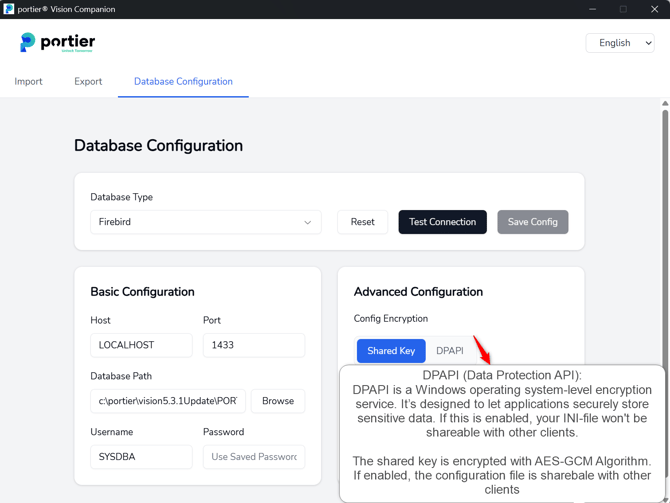
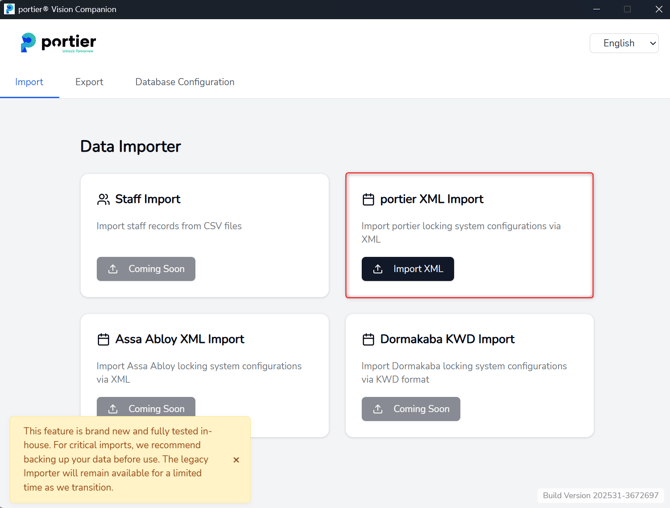
Coming Soon: XML imports for ASSA Abloy and Dorma Kaba systems to follow in coming weeks.
Intuitive Interface: Modern look, simple onboarding, and significantly faster workflows.
Fixed Firebird database error
After migrating to Vision 5.3.1, system/anlage data could not be loaded into the grid. This issue has been resolved.
Fixed SQL error on query forms
Corrected a duplicate column error (SONDERBESCHRIFTUNG).
Resolved document saving issue in Docu Vault
Fixed a missing folder error that previously prevented saving documents.
Improved error logging
On import failures, detailed error logs are now automatically saved in the AppData directory for easier troubleshooting.
The PDI importer has been rebuilt and made fully compatible with Vision 5. The following improvements are included:
Better error logging
Import failures now generate detailed logs saved in the AppData directory.
Improved CSV file handling after importAfter a successful data import, the CSV file is automatically moved to the AppData directory.Only one CSV file is kept in AppData at a time. When a new import succeeds, the previous CSV file is deleted and replaced with the new one.
After a successful data import, the CSV file is automatically moved to the AppData directory.
Only one CSV file is kept in AppData at a time. When a new import succeeds, the previous CSV file is deleted and replaced with the new one.
Release Date: July 24, 2025
Improved Security for Your Access Systems
With the latest ISO 27001 certification (June 2025), portier continues to set new standards in security and reliability.
What’s New?
Vulnerability Fixed: A rare issue allowing limited access after role removal has been resolved.
Performance Boost: Paginated views for keys, cylinders, and personnel (max 50 entries/page) significantly improve performance, especially with large data sets.
Important: Please install the update immediately to benefit from these security and performance improvements.
Release Date: July 4, 2025
Users can now only reorder keys and cylinders assigned to their respective depot.
Permissions: Only users with depot assignment and at least “Clerk” role can reorder. Admins retain full access.
System Settings: Permission can be toggled in “Basic Settings & Manage Modules”.
User Management: Admins can assign depot-specific ordering rights.
Ordering Module: Displays only items assigned to the user's depot.
Goods Receipt: After receipt, items are automatically assigned to the correct depot.
👉 See the detailed guide: "Reordering Restrictions by Depot Assignment"
Release Date: May 30, 2025
CAD Library Bugfix: Fixed error where cylinders weren’t displayed in plans.
French Reports Overhaul: All French-language reports corrected, unified, and aligned with terminology standards (requires reinstallation).
Release Date: May 15, 2025
Improved SSO Username Handling: Case sensitivity is now respected for Windows logins.
Offline License Bugfix: Fixed rare issue with incorrect date/time after using offline license.
Release Date: May 8, 2025
CAD Library Update: Latest CAD files can now be imported directly.
Release Date: May 6, 2025
Fixed License Server Connection: Internal ping test now targets only relevant services (chargebee.com, sendgrid.com) for more stable checks.
Release Date: April 28, 2025
KeyOnTheGo API Fix: Fields for personnel ID/name no longer mandatory when creating signature requests.
Auto-Correction for Key Status: Script now automatically resolves inconsistencies between "issued" and "in stock" statuses during updates.
Release Date: March 11, 2025
SSO Bug Fix: Resolved Single Sign-On issues reported by some users.
Release Date: March 7, 2025
Online/Offline Registration Bug Fixed
Extended Logging Mechanism added for troubleshooting.
Release Date: February 20, 2025
Syntax Error Fix when selecting a key carrier in depot
Date-Time Bugfix in DocuVault
Session Error Fix when switching systems
SSO Logging Enhanced
Improved Password Hashing
Product Availability:KeyOnTheGo and DocuVault: Available in Professional versionQuery Keeper: Only in Plus license
KeyOnTheGo and DocuVault: Available in Professional version
Query Keeper: Only in Plus license
Release Date: February 7, 2025
Startup Error Fix related to improved password hashing
Release Date: February 5, 2025
SQL Error Fix when issuing/returning keys, preventing screen lock-up for others
Release Date: January 27, 2025
Improved Password Policy using PBKDF2
KeyOnTheGo Signature Save Bug Fixes
Release Date: January 12, 2025
SQL Bug Fix in key issuing/returning
Performance Improvement with optimized prepared statements
Release Date: December 20, 2024
SQL Security Update:All queries reviewed and updated to parameterized formatImproved performance and protection against SQL injection
All queries reviewed and updated to parameterized format
Improved performance and protection against SQL injection
Release Date: November 18, 2024
Login Window Bug Fix causing user error messages
Release Date: October 31, 2024
Improved French Translations
UI Flicker Bug Fix
Release Date: September 26, 2024
"No Active Document" Error Fix
INI File Save Error Fix
Installation Permission Fix for "Program Files (x86)"
Release Date: September 16, 2024
MSQL 2017 Compatibility Fix
Release Date: September 12, 2024
401 Unauthorized & SQL Token Errors Fixed
CSV Import/Export Restored
Chargebee/SendGrid APIs Separated
Release Date: August 29, 2024
Signature Pad Display Bug Fixed
Release Date: August 19, 2024
Version Display in Registration Form
Spelling Corrections & API Error Message Update
Release Date: August 12, 2024
SSO Code Bug Fix
Release Date: August 5, 2024
OTP via API instead of SMTP
Report Designer Optimization
Login Screen Help Improvements
Release Date: July 17, 2024
Offline Activation support added
Release Date: July 9, 2024
Library Updates for stable license activation
Release Date: June 27, 2024
Optimized Record EditingRecords now unlocked by defaultSave button locks record
Records now unlocked by default
Save button locks record
Release Date: June 26, 2024
OTP from Support available in exceptions
Release Date: June 24, 2024
New CleanSlate UI
QuickTiles Dashboard
QueryKeeper
DocuVault Document Management
Upgrade via standard procedures. Support available if needed.
Release Date: July 5 / 17, 2024
VIS-110/111: Restrict order finalization to specific users via global settings and checkbox-level permission
Release Date: May 22, 2024
VIS-98: Fixed database error preventing system assignment to users
Release Date: April 17, 2024
VIS-92: Re-enabled Digipad for key returns
Release Date: March 18, 2024
VIS-90: SQL injection vulnerability on login fixed
Acknowledgement to community for reporting
Release Date: March 7, 2024
Optimistic and Pessimistic Locking (VIS-12)
Firebird 4.0 Upgrade (VIS-9)
Right-click menu for key handling (VIS-14)
Digipad signature for loss (VIS-15)
Date/time handling improvements (VIS-22)
Full name display in reports (VIS-44)
Branding update (VIS-59)
Release Date: January 22, 2024
New Features: EV code signing, simplified UI, updated version format
Bug Fixes: Date issues, UI duplication, Firebird login
Stronger Password Options
Improved Error Logging